UX / UI Case Study — Enterprise B2B
Railing Solutions - OMS (Order Management System) was a digital transformation initiative aimed at centralizing and streamlining the order management process across the organization.
Streamlined
process
Operational
Visibility
Business
Impact
Role
UX & UI Design
Scope
Research → Flows → UI → UAT
Method
Linear → Agile

Overview
Prior to OMS, order-related activities were managed through multiple disconnected channels including Excel spreadsheets, email communications, SAP transactions, physical documents, and manual coordination between teams.
The project's goal
To establish a single source of truth for order management, improve visibility across the order lifecycle, reduce operational inefficiencies, and provide accountability throughout the process.
Responsibilities
Process Discovery
UX Strategy
User Flow Mapping
Information Architecture
Wireframing
Interaction Design
Stakeholder Workshops
Design Reviews
Developer Collaboration
Business Background
The organization had grown significantly over the years, but the order management process remained heavily dependent on manual methods.
Teams used:
Excel trackers
Email chains
SAP transactions
Printed documents
Phone calls
Individual experience and knowledge
Since information was distributed across multiple systems and people, there was no end-to-end visibility into the order lifecycle.
Different teams understood only their portion of the workflow, making it difficult to understand the complete process.
In many situations, even business stakeholders could not fully explain the end-to-end flow because knowledge was accumulated over years through manual practices and workarounds.
Business Problem
The order management process was heavily dependent on manual coordination across multiple teams, systems, and communication channels. Critical information was distributed across Excel spreadsheets, email threads, SAP transactions, and physical documents, creating a fragmented working environment with no centralized source of truth.
As a result, stakeholders struggled to gain visibility into the status of orders, track approvals, locate supporting documents, and identify ownership at various stages of the process. Employees frequently relied on emails, phone calls, and personal follow-ups to obtain updates, leading to delays, inefficiencies, and inconsistent information across teams.
Challenge
A major challenge was that the workflow itself was not clearly defined or documented. Process knowledge existed largely within individuals who had managed the operations manually over time, making it difficult to understand the complete end-to-end journey, identify bottlenecks, or establish accountability.
Expected
The organization needed a scalable digital solution that could centralize information, streamline approvals, improve transparency, and provide end-to-end visibility across the order lifecycle while reducing dependency on manual communication and disconnected tools.
Tools analysis
SAP (Configure, Price, and Quote)
Pros: Native integration with SAP ERP/S4HANA sharing one set of pricing and approval rules, built-in margin protection and discount controls
Cons: Heavy to implement and run, best suited to large manufacturers already deep in SAP, not lighter teams
Zoho CRM (no dedicated CPQ)
Pros: Fast self-onboarding, often under two weeks, no dedicated admin needed; solid out-of-the-box reporting
Cons: Hits a ceiling once compliance workflows, multi-stage approvals, or serious ERP integration are needed the exact gap OMS had to close
Salesforce CPQ
Pros: Large ecosystem (7,000+ integrations); strong multi-stage approval workflows and compliance handling for regulated industries
Cons: Priced and licensed separately from the base CRM, adding real cost; slower rollout, typically 8–16 weeks with consultants
Indirect Competitors — General CRM / Manual Alternatives
Manual Process — Excel + Email + SAP (pre-OMS state)
Pros: No licensing cost, fully flexible to informal workarounds, zero rollout or training needed
Cons: No shared source of truth, no audit trail, no automated approval routing — the core problem OMS was built to solve
Research and discovery.
There was no existing tool to audit ( Internal ), and no user base already trained on a system. Discovery meant reconstructing the current state from the people who ran it manually, then validating continuously once real usage began.
Requirement extraction — worked directly off the BRD and repeated review cycles with Operations, Design and Finance leads to understand exactly where the Excel-and-email process broke down.
Pattern benchmarking — looked at how comparable order and quote-management tools structure BOM builders, tiered approvals and status dashboards, so the design didn't reinvent patterns these roles might already recognize from adjacent tools.
Validation — since nobody had used a digital version of this process before, the real learning happened after release. Where sales or design teams got stuck fed straight back into the next iteration the reason this became an agile project.
Design system alignment — built on the existing design system already in use elsewhere, so OMS felt familiar rather than like a new tool bolted on.
User Personas
The hardest part of this system wasn't any single screen — it was that five different people needed different things from the same enquiry, at different moments in its life.
Sales
Design / Product Team
Planner
Finance
Approvers
Sales Executive
Goal
Log enquiries fast, get quotes out without chasing other teams
Pain today
Specs, drawings and pricing scattered across files; no status trail
Needed from OMS
One enquiry form, visible status, visible approval bottlenecks
Design / Product Team
Goal
Turn an enquiry into an accurate, priced BOM
Pain today
Manual pricing from static sheets, no traceability, slow rework
Needed from OMS
Live SAP pricing, a clean path to add new materials, one-click approval request
Planner
Goal
Convert a won BOQ into a production-ready Final BOQ
Pain today
No structured handoff from quote-stage to production-stage data
Needed from OMS
Pre-loaded BOM, editable cut sizes, direct push to SAP
Finance Team
Goal
Approve quotes and vet credit terms without slowing sales
Pain today
No automatic signal for which quotes need sign-off, or when
Needed from OMS
Margin-triggered approval requests, a clear pre-production gate
Approver — Regional Manager / Sales Head / Business Head
Goal
Approve or reject margin-sensitive quotes quickly
Pain today
No automatic sigApprovals happen over ad hoc email, no visibility on what's pending wherenal for which quotes need sign-off, or when
Needed from OMS
A tiered flow that routes automatically by margin, with visible status
Structure before Ideate.
I was the only designer on OMS for its full run — requirements through design, build support, testing and UAT. The project started as a linear rollout, then shifted into agile as real usage surfaced things no document could have predicted.
Hybrid Agile (Phase-Gate Design)
At every stage of the system, I worked through the same six-step framework before a single screen got drawn:
Users
Who touches this part of the system
Data Objects
What they're creating or acting on
States
What stages that object moves through
Workflow
Who moves it, and under what condition
Components
Reusable patterns across screens
UI
The screen, built on everything above
This is what let the design hold up under agile iteration — when a flow changed, I could trace exactly which layer it lived in, instead of redrawing screens from scratch.
Information architecture
One hierarchy, five roles moving through it.
Everything in OMS traces back to five nested objects. Getting this hierarchy right was what made the rest of the design predictable — every screen is just one object in this tree, at one state.
Project (CRM)
└── Opportunity — one per product segment
└── Enquiry (OMS) — Mockup or Commercial
├── Product line items — Top Profile / Bottom Profile / Glass
│ └── BOM — 5 buckets: Bottom · Glass · Top · Consumables · Surcharge
├── Attachments — shop drawing, load report, site documents
├── Approval chain — routed by margin %
└── on WON
├── Work Order + BG details
├── Final BOQ (Planner)
│ └── Supply Lot → SAP PR
└── handoff → Service Management
Two structural decisions carried the most weight: enquiry state cascades to opportunity state automatically, so nobody updates status twice — and the BOQ has two distinct lives, a quote-stage version used for pricing and approval, and a Final BOQ the Planner builds for production. Same lineage, different screens, different rules.
An enquiry's life, and who's allowed to move it.
This is the part of the system that couldn't be a static form — status had to reflect real business rules, and different people needed to see different things at each stage.
Created
Quote Requested
Quote Created
Quote Approved
Sent to Customer
WON
Lost
Two actions look similar on paper but needed to stay separate: Resend is Design asking Sales for clarification, it pushes the enquiry back a stage. Revoke is Sales asking to edit after submission, it requires Design's acceptance first. Collapsing these into one generic "send back" action would have hidden who was actually blocking whom.
Approval routing is entirely margin-driven — the screen resolves who needs to sign off based on the number entered, not a fixed list:
e.g.
Margin Approvers required
> 35% Regional Manager only
25–35% Regional Manager + Sales Head
< 25% Regional Manager + Sales Head + Business Head + Finance Head
Phase 1: "WON" isn't one click — it's a state with mandatory document capture (BG, WO, GST, Aadhar) that has to complete before the status actually commits. I designed this as a guided popup rather than a form buried in the enquiry page, so sales can't accidentally mark a deal WON without the paperwork attached.
Phase 2: "WON" is just a single transaction.
User Journey Map
Stage
User
Action
System / Touch point
Pain Points (Current State)
Opportunity
1. Enquiry Creation
Sales Executive
Create enquiry and enter customer details
OMS
Customer details tracked in emails/spreadsheets
Centralized enquiry creation
2. Product Addition
Sales Executive
Add products, quantities, specifications, attachments, drawings
OMS
Missing information, attachment version issues
Structured product and document management
3. Quote Request Submission
Sales Executive
Submit quotation request
OMS Workflow
No visibility after submission
Real-time status tracking
4. Design Review
Product Team
Review enquiry, specifications, diagrams
OMS Work Queue
Manual follow-ups from sales
Shared visibility
5. Design Preparation
Product Designer
Prepare technical design and cost inputs
OMS Design Workspace
Multiple document versions
Centralized design repository
6. Quotation Creation
Product Team
Generate quotation
OMS
Quote preparation delays
Standardized quotation templates
7. Approval Submission
Product Team
Submit quotation for approval
OMS Approval Workflow
Email-based approvals
Automated workflow
8. Approval Review
Approver
Review quotation
Approval Dashboard
Approval status invisible
Transparent approval tracking
9A. Approval Outcome
Approver
Approve quotation
OMS
Manual communication of approval
Automatic notifications
9B. Rejection Outcome
Approver
Reject quotation with comments
OMS
Rework not clearly tracked
Structured feedback loop
10. Quote Receipt
Sales Executive
Receive approved quote
OMS Notification
Delayed communication
Instant visibility
11. Work Order Creation
Sales Executive
Create WO using approved quote
OMS
Duplicate data entry
Auto-population from quote
12. Validation Review
Validation Team
Validate order details
OMS Workflow
Lack of ownership
Role-based accountability
13. Finance Approval
Finance Team
Verify pricing and approve
OMS Approval Workflow
Approval bottlenecks
SLA-based approvals
14. WO Approval
Finance/Business Approver
Approve work order
OMS
Manual tracking
End-to-end audit trail
15. SMS Integration
System
Approved WO triggers SMS System
OMS ↔ SMS Integration
Manual handoffs
Automated integration
16. BOQ Request Generation
SMS System
Generate BOQ request
SMS
Lost communication between systems
System-generated requests
17. Planning Assignment
Planner
Receive BOQ request and begin planning
SMS/Planner Portal
No visibility on planning status
Status visibility across teams
18. Planning Completion
Planner
Prepare BOQ
SMS
Delays due to poor tracking
Workflow monitoring
Role Matrix
Activity
Create Enquiry
Add Products
View Attachments
Design Solution
Create Quote
Approve Quote
Create WO
Validate WO
Finance Approval
Receive WO
Prepare BOQ
Sales
✅
✅
✅
✅
❌
❌
✅
❌
❌
❌
❌
Product Team
❌
❌
✅
✅
✅
❌
❌
❌
❌
❌
❌
Approver
❌
❌
✅
✅
❌
✅
❌
❌
❌
❌
❌
Validation
❌
❌
✅
❌
❌
❌
❌
✅
❌
❌
❌
Finance
❌
❌
✅
❌
❌
❌
❌
✅
✅
❌
❌
SMS (Tool)
❌
❌
✅
❌
❌
❌
❌
❌
❌
✅
❌
Planner
❌
❌
✅
❌
❌
❌
❌
❌
❌
❌
✅
Flow Chart
The full task flow below is what I actually mapped in Figma — Sales enquiry creation, Designer BOM approval, Planner's two entry points into the BOQ, and Finance's approval queue.

OMS Task Flow — Sales, Designer, Planner and Finance Approver lanes
One thing this flow surfaced that a status diagram alone wouldn't have: the Planner has two separate entry points into the same BOQ object — a fresh request flow driven by site measurement data, and a "won-case" flow triggered once an enquiry closes. Same downstream object, two different triggers, two different starting screens. Designing for that split — rather than forcing one generic "create BOQ" flow — is what kept both paths simple instead of one path overloaded with conditions.
Wireframe
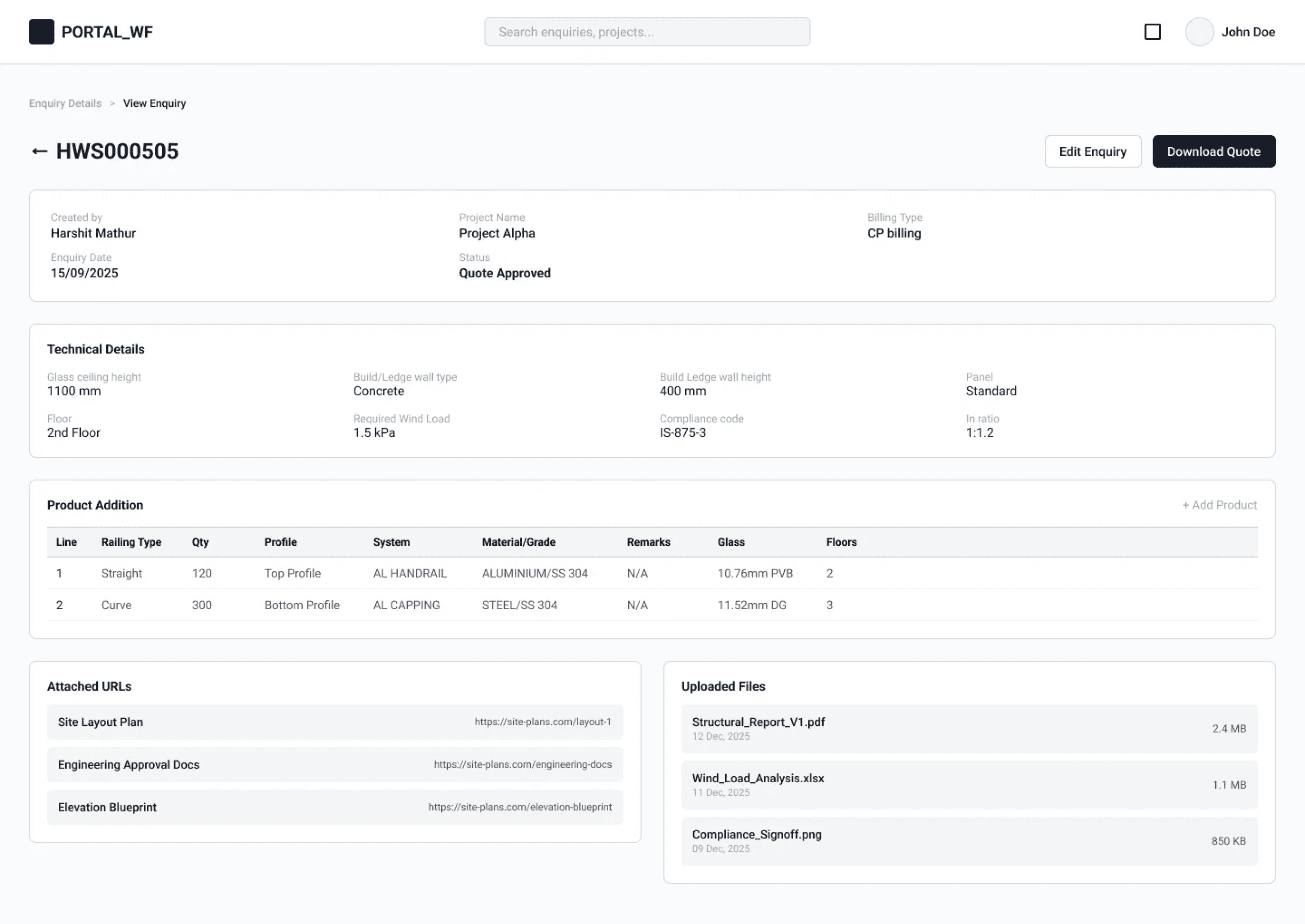
Low Fidelity
A rapid wireframe to finalize the layout, behavior, forms & UI architected




UI Visual
High Fidelity
Based on the Design system and components.


Giving structure to a process that never had any, one stakeholder conversation at a time.
Case study by Rupan Balaji — UX UI Interaction Designer
Back to top ↑